Paperwork Formatting
For all your pencil pushing needs.
| Formatting Paperwork:
|
|
Bolded Text:
| How To:
|
Outcome:
|
| This text is normal. [b]This text is bolded![/b]
|

|
Centering Text:
| How To:
|
Outcome:
|
| [center]This text is centered![/center]
|

|
Field:
By inserting the [field] tag into your text it allows users to "Write" where you placed the field tag instead of at the bottom of the paper.
| How To:
|
Outcome:
|
| Reason for breaking marine law: [field]
|

|
Headings:
| How To:
|
Outcome:
|
|
[h1]Heading One[/h1]
[h2]Heading Two[/h2]
[h3]Heading Three[/h3]
|

|
Horizontal Rules:
| How To:
|
Outcome:
|
|
Text above
[hr]
Text below
|

|
Italics:
| How To:
|
Outcome:
|
| [i]This text is italicized.[/i] This text is normal.
|

|
Large Text:
| How To:
|
Outcome:
|
| [large]This text is very large![/large] This text is normal-sized.
|

|
Line Breaks:
| How To:
|
Outcome:
|
|
Text above
[br]
Text below
|

|
Lists:
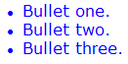
By using [list]and [/list] tags you can create an organized document for your paperwork needs. Keep in mind that for every entry you will need to use [*] to bullet point it.
| How To:
|
Outcome:
|
|
[list]
[*]Bullet one.[*]Bullet two.[*]Bullet three.[/list]
|
|
Signing:
| How To:
|
Outcome:
|
| Your signature: [sign]
|

|
Small Text:
| How To:
|
Outcome:
|
| This text is normal-sized. [small]This text is very small![/small]
|

|
Underlining:
| How To:
|
Outcome:
|
| [u]This text is underlined. Enjoy![/u]
|

|
Weyland-Yutani Logo:
| How To:
|
Outcome:
|
| [logo]
|

|
|